How I Let an AI Agent Send Email in Client Projects
The setup I use when a client wants an AI agent to send email: a separate subdomain, one key per agent, send limits, a kill switch and a person approving the risky emails.
When a client asks me to let an AI agent send email, I never connect the agent to the same mail setup their website uses. The agent gets its own sending subdomain, its own API key with a hard limit, and a way to stop it with one click. That keeps the client’s main domain safe even if the agent misbehaves.
I’m Zain Saeed, a web developer who builds sites and AI automation for small businesses. I’ve worked on client projects for 8+ years and won Fiverr’s Millionaire Award for $1M+ in orders. More of my recent projects now include an agent that writes and sends email, so this is the setup I use for them.
In this guide
The short answer
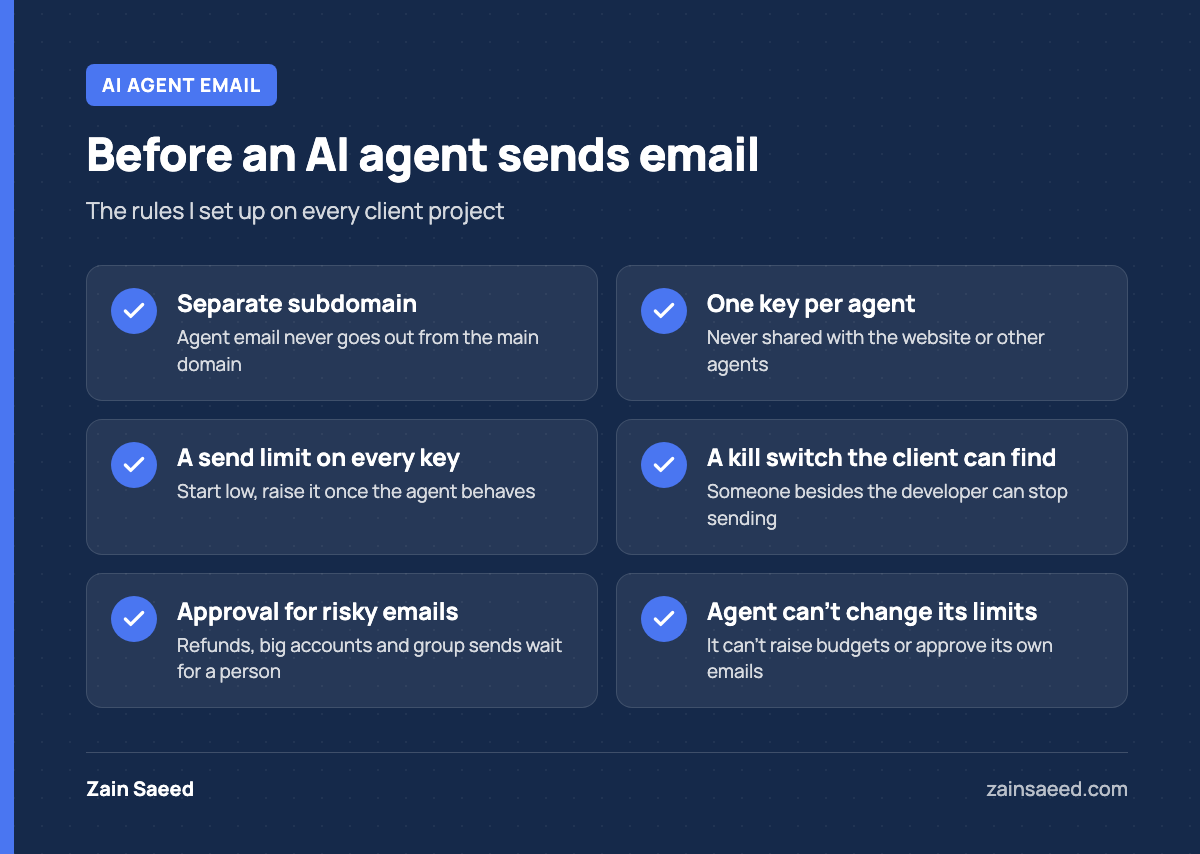
I give each agent its own sending subdomain and API key, put a send limit on that key, and make sure the client can stop sending with one click. Risky emails wait for a person to approve them, and the agent can never change its own limits.
Why agent email needs its own setup
Normal website email is predictable. A contact form sends a notification and a store sends a receipt. I can read the code and know when an email goes out.
An agent decides for itself. It picks the recipient, writes the message and chooses when to send. But one bad loop, a confused prompt or a mixed-up customer record can send the wrong email many times before anyone looks.
The part clients rarely think about is the domain. Every email a business sends shares one reputation with Gmail, Outlook and the other mailbox providers. If an agent sends a burst of messages to bad addresses, the bounce rate goes up. Then the password resets and order confirmations from the website start landing in spam too. The agent’s mistake becomes the whole business’s problem.
My rule of thumb: an agent should never be able to damage the email the website depends on. Separate subdomain, separate key, hard limit.
What I set up before the first send
Before I write any agent logic, I set up the sending side. This is the order I do it in:
| Risk | What I set up |
|---|---|
| Agent hurts the main domain | A sending subdomain with its own DKIM and return-path records, plus SPF and DMARC |
| One agent’s problem stops everything | A separate API key for each agent |
| Sudden flood of emails | A send budget on the key, per hour or per day for new agents |
| Same email sent twice on a retry | An idempotency key on every send request |
| Testing emails real customers | Test addresses that accept mail and deliver it to nobody |
| A sensitive email goes out unchecked | An approval queue for those email types |
The idempotency key deserves a note. Agents retry steps that look like they failed. If the first request actually went through, a retry without an idempotency key sends a second copy. With the key, the email service sees the same request and sends it once. This one header fixes most duplicate-email complaints I’ve seen.
The sending service I use
For agent projects I now use AgentiSend, an email API built for AI agents. I picked it because the controls in the table above are built in. I don’t have to build them myself on top of a normal email API.
What matters for my client work:
- Send budgets per key. Each API key has a budget. Monthly is the default, and you can set it per hour or per day. When a key hits its budget, that key stops and the others keep sending.
- Kill switch. It can pause one key or all of them.
- Loop guard. It catches repeat sends of near-identical email to the same address.
- Approval queue. Held emails wait until a person approves them.
- Limits the agent can’t lift. An agent cannot raise its own budget, turn off its own kill switch or approve its own held email.
It also covers normal transactional email such as password resets and receipts, with webhooks, scheduled sends, batch sends of up to 500 emails, and a log of every email with its delivery status.
Setup follows the AgentiSend quickstart guide: add the subdomain, publish the DNS records it gives you, verify, create a key with a budget, then send with one POST request. For tests I point the agent at addresses on simulator.agentisend.com, which accept mail and deliver it to nobody.
Connecting the agent through MCP
Many of the agents I build or wire up run inside Claude, Cursor or VS Code. For those I don’t write sending code at all. AgentiSend has a hosted MCP server, so the agent gets email tools directly. In Claude Code it is one claude mcp add command. The AgentiSend MCP guide has the steps for each client app.
The same limits apply through MCP. When a send is refused, the agent gets an error that says why and what would fix it. A clear reason helps the agent stop and tell you, instead of retrying.
What I hand over to the client
A setup like this only works if the client knows how to use it after I leave. At handover I go through three things with them:
- Where the kill switch is. I show them how to pause one agent’s key, and how to pause everything.
- Which emails need approval. We agree on the list together. Usually: refunds, anything to their largest customers, and anything sent to more than a handful of people.
- Which numbers to check each week. Bounce rate and spam complaint rate per domain. AgentiSend tracks both over a rolling seven days. It warns at a 2% bounce rate or 0.05% complaint rate, and pauses sending at 4% or 0.08%.
I also leave the send budget lower than the client expects to need. Raising it takes a minute. Fixing a blocklisted domain takes much longer.
When I don’t give an agent email at all
Not every project needs an agent that sends email. I advise against it when:
- The emails are fixed. If the message is the same every time, a normal form notification or automation is simpler and cheaper to run.
- Nobody will watch it. If no one on the client’s side will look at approvals or the weekly numbers, I keep the agent on drafts that a person sends.
- The content is high-stakes. Legal notices, medical details or billing disputes should be written or at least approved by a person every time.
A good middle step is to put every agent email in the approval queue at first, then let it send some email types on its own once the client trusts it.
Frequently asked questions
Can an AI agent use my normal Gmail or Outlook account to send email?
It can, but I don’t set it up that way for business use. A personal mailbox has no per-agent limit or approval queue, and a mistake hits the account your team uses every day.
Do I need a separate domain for agent email?
A subdomain of your main domain is enough, for example mail.yourbusiness.com. It keeps the agent’s sending apart from your main domain while still looking like your business to recipients.
How low should the first send limit be?
Low enough that a runaway agent can’t do much damage before someone notices. I set it close to what the agent should send in a normal day, then raise it once the logs look right.
If you want an AI agent added to your website or business tools, with email limits set up from day one, I build these as part of my AI and custom development work. Send me a short brief and tell me what you want the agent to do.