WordPress vs Squarespace for a Small Business Website
A developer's plain comparison of the two platforms, including current Squarespace plan prices and what you can and can't take with you if you leave.
In the WordPress vs Squarespace choice for a small business, Squarespace is the better pick if you want a good-looking site live quickly and don’t plan to grow it much. WordPress is the better choice if the website is a main source of leads, if you plan to publish a lot, or if you need features and control that a hosted builder doesn’t give you. The deciding questions are who will maintain the site and how much you expect it to grow.
I’m Zain Saeed, a WordPress and Shopify developer. I’ve shipped 120+ projects over 8+ years and won Fiverr’s Millionaire Award for $1M+ in orders. I build mostly on WordPress, so I’ll be clear below about where Squarespace is simply the easier option.
In this guide
Short answer
- Choose Squarespace if you need a simple 5–10 page site, you want to edit it yourself in a visual editor, and you don’t want to deal with hosting, updates or plugins.
- Choose WordPress if search traffic matters to you, you’ll publish regularly, you need custom features (booking rules, member areas, integrations), or you want full ownership of the code and data.
- Either works for a basic brochure site. The difference shows up a year or two later, when you want to add things or move.
Side-by-side comparison
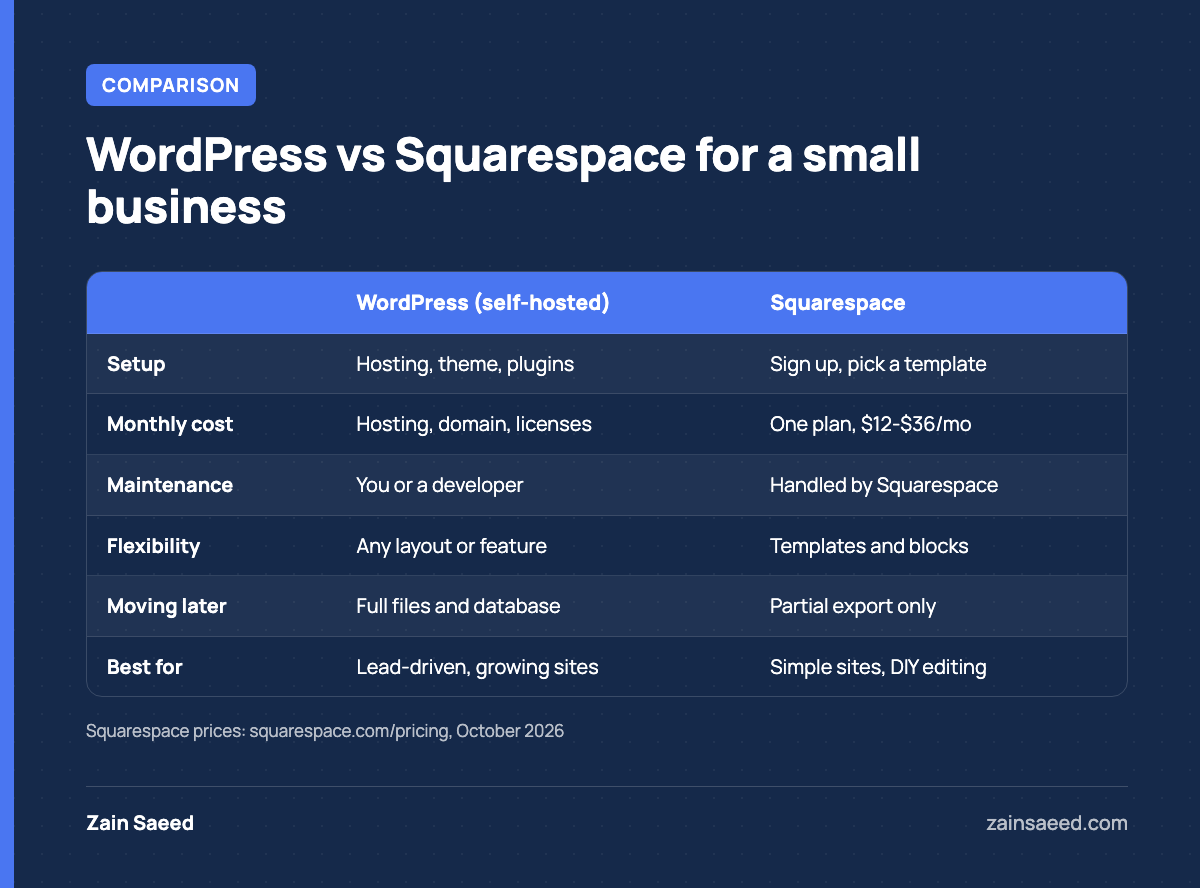
Here, “WordPress” means self-hosted WordPress from WordPress.org running on your own hosting, which is what most business sites use. WordPress.com is a separate hosted service with its own plans.
| WordPress (self-hosted) | Squarespace | |
|---|---|---|
| What it is | Free, open-source software you install on hosting you choose | Hosted website builder with a monthly or annual plan |
| Setup | Hosting, theme and plugins to set up, or a developer does it | Sign up, pick a template, start editing |
| Maintenance | You (or someone you pay) update core, theme and plugins | Squarespace handles hosting, security and updates |
| Design freedom | Any layout, custom theme possible | Within Squarespace templates and blocks |
| Features | Thousands of plugins, custom code where needed | Built-in features plus a smaller set of extensions |
| Moving away | Full files and database are yours to move | Export tool covers only some content |
What each one costs
Squarespace
Squarespace is one bill. At the time of writing, its pricing page lists three website plans:
| Plan | Billed annually | Billed monthly | Fee on store sales |
|---|---|---|---|
| Basic | $12/mo | $19/mo | 2% |
| Core | $17/mo | $27/mo | 0% |
| Advanced | $25/mo | $36/mo | 0% |
The same page says annual plans include the first year of a domain, and that there is a 14-day free trial but no free plan. Prices change, so check that page before you decide.
WordPress
The WordPress software itself is free. WordPress.org describes it as open-source software licensed under the GPL (About WordPress). What you pay for is everything around it:
- Hosting: from cheap shared plans to managed WordPress hosting.
- Domain: a yearly renewal.
- Premium theme or plugins: many are free, some charge yearly licenses.
- Maintenance: your time, or a monthly plan with a developer.
So WordPress can cost less or more than Squarespace per month, depending on the hosting and plugins you choose. The bigger cost difference is usually the build. A Squarespace site can be set up by the owner. A WordPress business site is usually built by a developer. My own fixed-price packages start at $1,200–$2,500 for a five-page site (see pricing).
Control, ownership and moving later
This is the point most owners don’t think about until it matters.
With self-hosted WordPress, the files and database sit on your hosting account. You can move them to another host or another developer at any time, because the software is open source and the whole site is yours to copy.
With Squarespace, your site runs on Squarespace’s platform. Squarespace’s own help guide on exporting your site says the export is a WordPress-format XML file, and it lists what is left out, including:
- Store pages, album, portfolio and calendar pages, and other page types besides layout and gallery pages
- Video, audio and product blocks
- More than one blog page
- Style settings and custom CSS
- Drafts
In practice, moving off Squarespace means rebuilding the design and re-creating some pages by hand. That is fine if you plan to stay on Squarespace. It is worth knowing before you put years of content into it.
Rule of thumb: if you might outgrow the site in two or three years, start on the platform you would move to anyway.
SEO, content and growth
Both platforms let you set page titles, meta descriptions and clean URLs, and both can rank. A well-written Squarespace site will beat a neglected WordPress site. The differences show up as the site grows:
- Content volume: WordPress handles hundreds of posts, custom post types (services, locations, team members) and categories without strain.
- SEO tooling: plugins like Yoast SEO give you detailed control over schema, sitemaps and redirects.
- Location and service pages: easier to build as templates in WordPress for businesses with several locations or many services.
- Speed work: on WordPress you control hosting, caching and images. On Squarespace you work within what the platform gives you.
- Integrations: CRMs, booking systems and custom forms are usually easier to connect on WordPress, sometimes with a small amount of code.
If you are already on a hosted builder and want to move, the process is similar to the one in my Wix to WordPress migration guide: map every URL, rebuild the pages, set up 301 redirects and check Search Console after launch.
Which one to choose
Squarespace is the better fit when
- You need a portfolio, a small service site or a simple event site.
- You want to make all changes yourself and don’t want to manage updates.
- Most customers find you by referral or word of mouth, not search.
- Your budget for the build is close to zero.
WordPress is the better fit when
- Leads from Google are a big part of your business.
- You plan to publish articles, case studies or location pages regularly.
- You need custom features or integrations.
- You want to own the site fully and be free to switch hosts or developers.
If you choose WordPress, plan for maintenance from day one: updates, backups and security checks. That ongoing work is the real cost of the extra control. If you want a developer to build it properly the first time, see my WordPress website design service.
Frequently asked questions
Is Squarespace cheaper than WordPress?
Often for the first year, because you can build it yourself. Over several years the gap shrinks, and a WordPress site can cost less per month on modest hosting. The build cost is usually the bigger difference.
Is WordPress better for SEO than Squarespace?
Both can rank. WordPress gives you more control as the site grows, especially for schema, redirects, large blogs and location pages.
Can I move from Squarespace to WordPress later?
Yes, but not completely automatically. Squarespace exports some pages and one blog to a WordPress-format file. Store pages, video blocks, styles and several page types have to be rebuilt.
Do I need a developer for WordPress?
Not to start a simple site. For a business site that has to generate leads, a developer saves time on setup, speed and security, and usually on maintenance too.
Is WordPress.com the same as WordPress.org?
No. WordPress.org is the free software you host yourself. WordPress.com is a hosted service built on it, with its own paid plans.
If you want a fixed-price quote for your WordPress or Shopify project, send me a short brief and I’ll tell you what it will take.